Grammarly Review: How Good It Really Is, What Pro Adds and Who Should Pay
Grammarly is still the most polished writing assistant. Use the free plan for spelling and grammar. Pay yearly for Pro if you want rewrites and extra checks.
Our rating
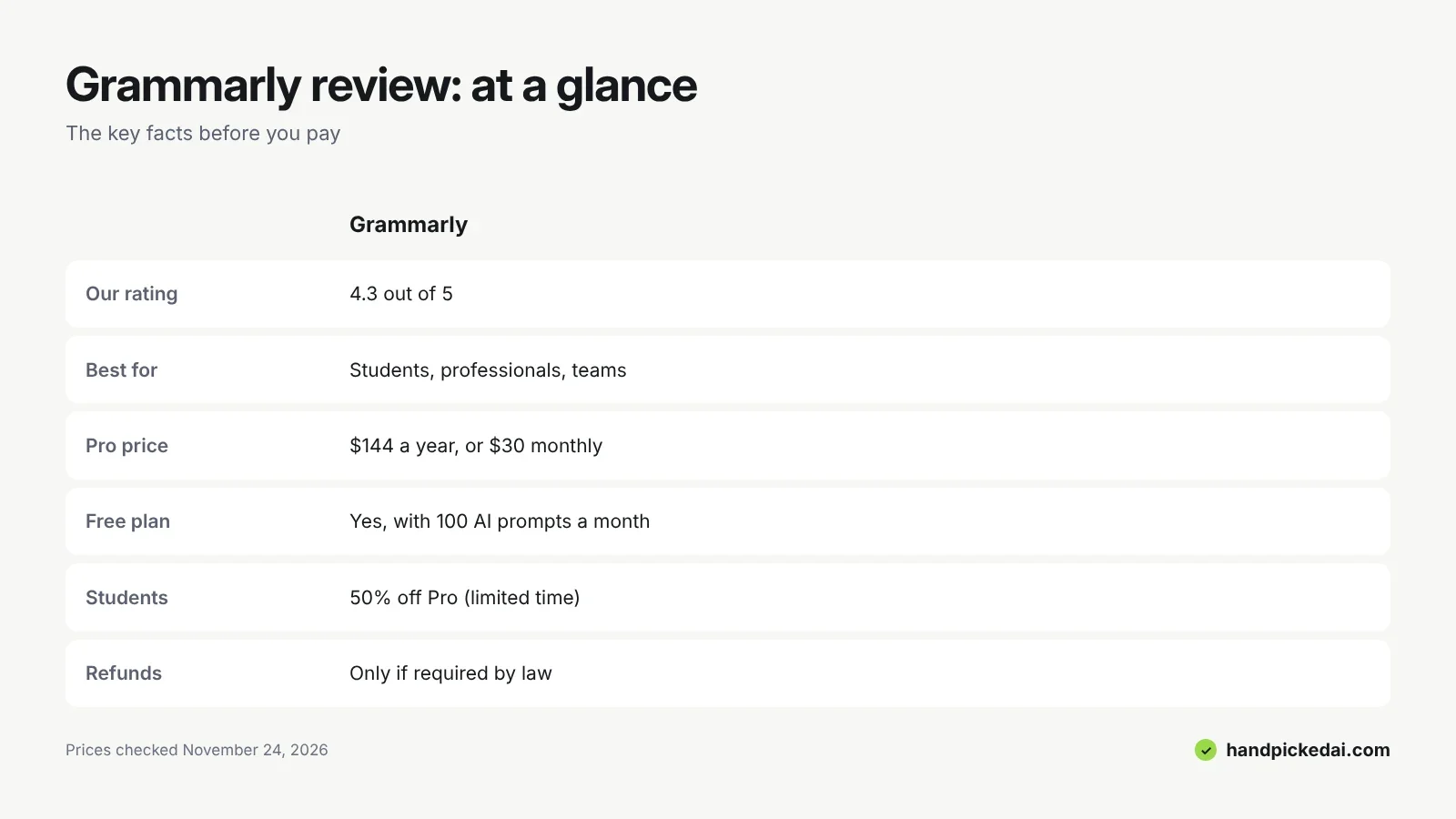
4.3 out of 5. Best for students, professionals and teams who write in English every day and want help everywhere they type.
Short answer: Grammarly is still the most polished writing assistant you can get. It catches spelling, grammar and clarity problems in almost every app you write in, and its free Authorship feature helps students prove their work is their own. Pro adds full-sentence rewrites, tone changes, 2,000 AI prompts a month, a plagiarism checker and a detailed AI detector.
It has weak spots. Its plagiarism checker did poorly in independent tests, its AI detector gives mixed results, rewrites can sound generic, and Grammarly doesn't refund unless the law requires it. Use the free plan if you just want clean spelling and grammar. Pay for Pro (yearly, not monthly) if you write a lot and want the rewrites, the AI and the extra checks.
Pros and cons
Pros
- Works almost everywhere: browsers, Word, Google Docs, email, Slack and phones
- Strong free plan for spelling and grammar
- Authorship shows how a document was written, for free
- Now checks more than 20 languages, not just English
- 50% off Pro for students right now
- High ratings: 4.7 on G2 and Capterra
Cons
- Pro is expensive if you pay monthly ($30)
- Plagiarism checker scored low in independent tests
- AI detector results are mixed
- Rewrites can feel generic or too formal
- No refunds unless required by law
- Your writing can be used for AI training unless you switch it off
Who Grammarly is for (and who it isn't)
Good fit: students writing essays, professionals who send a lot of emails and documents, non-native English writers, and teams that want one consistent tone.
Not a good fit: writers who want full control of their style (Grammarly can push you toward its own), people who need a strong plagiarism check for academic work, and anyone on a tight budget who would only use Pro occasionally.
How we reviewed Grammarly
We didn't run our own hands-on test for this review. We went through Grammarly's official plans, feature, privacy and help pages, read independent tests of its grammar checker, AI detector and plagiarism checker, and summarized user reviews on G2, Capterra, Trustpilot, the App Store and the Chrome Web Store. Every claim links to its source, and we flag tests run by companies that sell competing tools.
What's new at Grammarly in 2025 and 2026
Grammarly has changed more in the last two years than in the ten before:
- New parent company name: in October 2025, the company renamed itself Superhuman. The writing product is still called Grammarly, and it now sits next to Coda (docs), Superhuman Mail (email) and Superhuman Go (an AI assistant). The company says it has more than 40 million daily users (Grammarly).
- Acquisitions: Grammarly bought Coda in December 2024 (TechCrunch) and the Superhuman email app in July 2025 (TechCrunch).
- AI agents and Docs: in August 2025 it launched AI agents including Reader Reactions, AI Grader, Citation Finder, Proofreader, AI Detector, Plagiarism Checker and Paraphraser, plus a new writing space called Grammarly Docs (Business Wire).
- A controversy: in March 2026, Grammarly switched off its Expert Review agent after backlash. The agent gave AI feedback credited to real writers and academics without their consent, and journalist Julia Angwin filed a class action over it (Engadget, Nieman Lab).
- More languages: Grammarly now supports more than 20 languages (Grammarly). Many older reviews still say it's English only.
How accurate is Grammarly?
Very good on the basics, but tests disagree on how it compares.
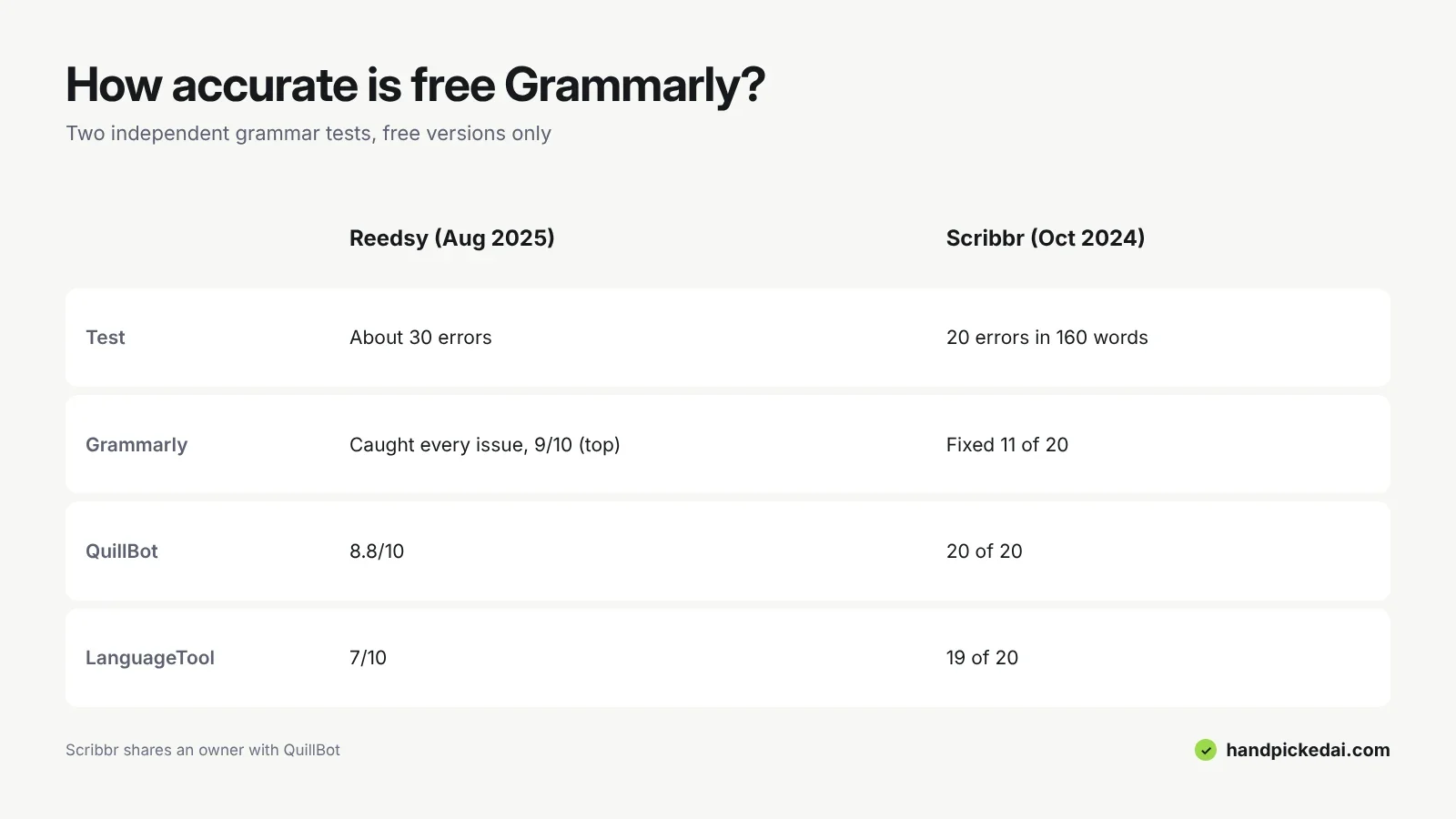
Reedsy (August 2025) tested free grammar checkers on a passage with about 30 errors. Grammarly "caught every issue in our test" and scored 9 out of 10, the top score, ahead of QuillBot (8.8), LanguageTool (7) and ProWritingAid (6.9) (Reedsy).
Scribbr (October 2024) tested a 160-word text with 20 errors. Free Grammarly fixed 11 of 20, behind QuillBot and Scribbr (20 of 20) and LanguageTool (19 of 20) (Scribbr). Scribbr is owned by the same company as QuillBot, and its own checker runs on QuillBot.
Both tests used the free version only. Pro catches far more: one reviewer found the free plan flagged 9 issues on an article and Pro flagged 53 (Capitalize My Title), though many of those are style suggestions rather than errors.
AI features and agents
Grammarly's AI goes well beyond fixing typos now:
- Rewrites and tone: Pro rewrites full sentences and adjusts tone, from more confident to more friendly (Grammarly).
- AI prompts: ask it to draft, shorten or explain text. Free includes 100 prompts a month and Pro 2,000.
- Agents: Reader Reactions predicts how a reader will respond, AI Grader estimates the grade an essay might get, Citation Finder suggests sources, and Proofreader and Paraphraser clean up and reword text.
- Grammarly Docs: a writing space where all of these work together.
Users like the speed but not always the result. One marketing manager on Capterra wrote: "Sometimes it feels like it suggests rewrites that are way too neutral or generic" (Capterra).
Authorship: proving your work is yours
Authorship is one of Grammarly's most useful features, and it's free. It records which text you typed, pasted or wrote with AI, then creates a color-coded report with a replay of how the document was written. It works in Google Docs, Word, Grammarly's editor and Canvas (Grammarly).
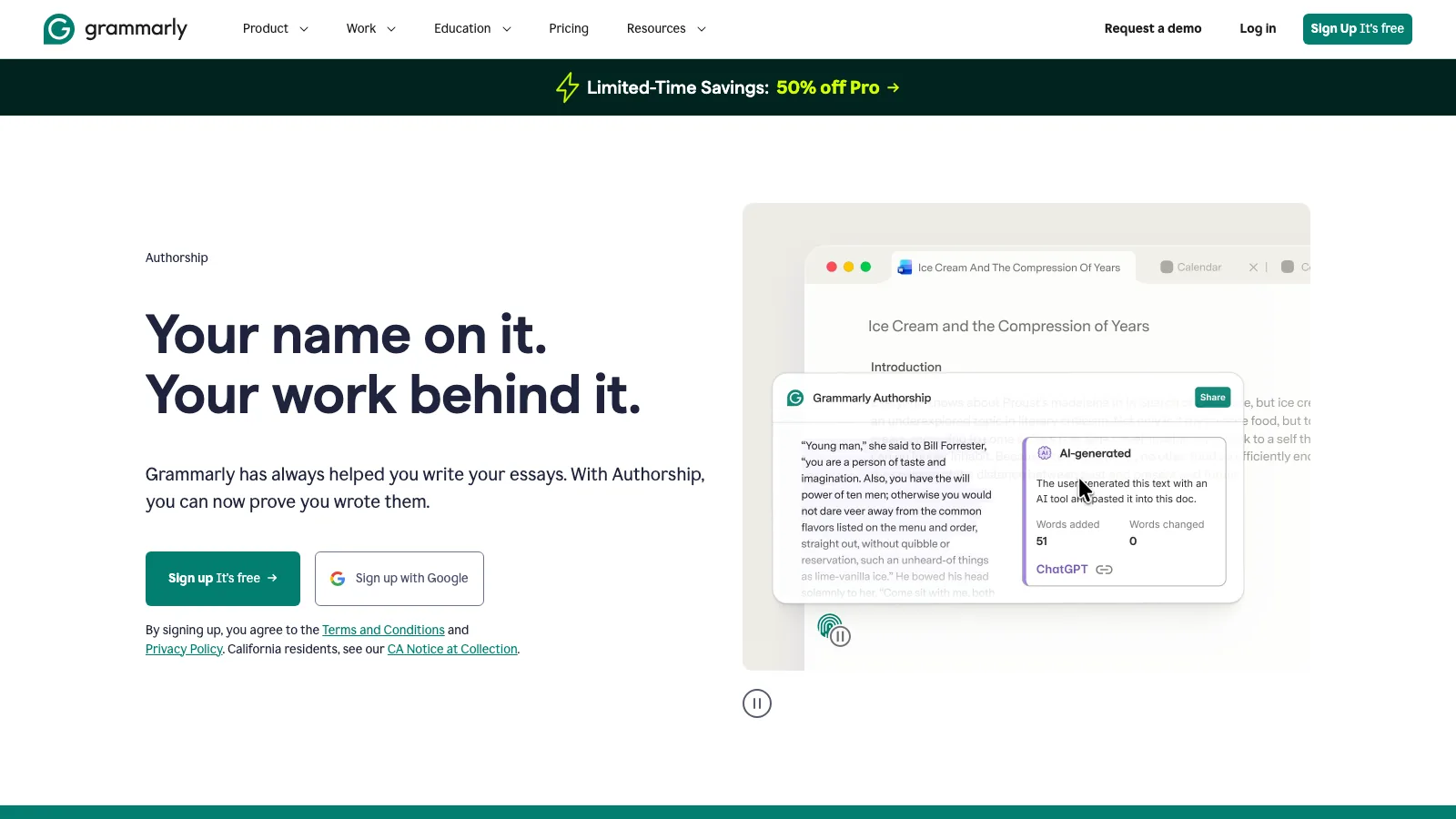
Image: Grammarly official website
For students worried about being wrongly flagged by an AI detector, this is the best reason to install Grammarly. For more student tools, see our list of the best AI tools for students.
AI detector
Mixed results. Grammarly gives a free AI score after sign-up, and Pro adds a phrase-by-phrase AI Detector agent. Grammarly itself says no AI detector is 100% accurate (Grammarly).
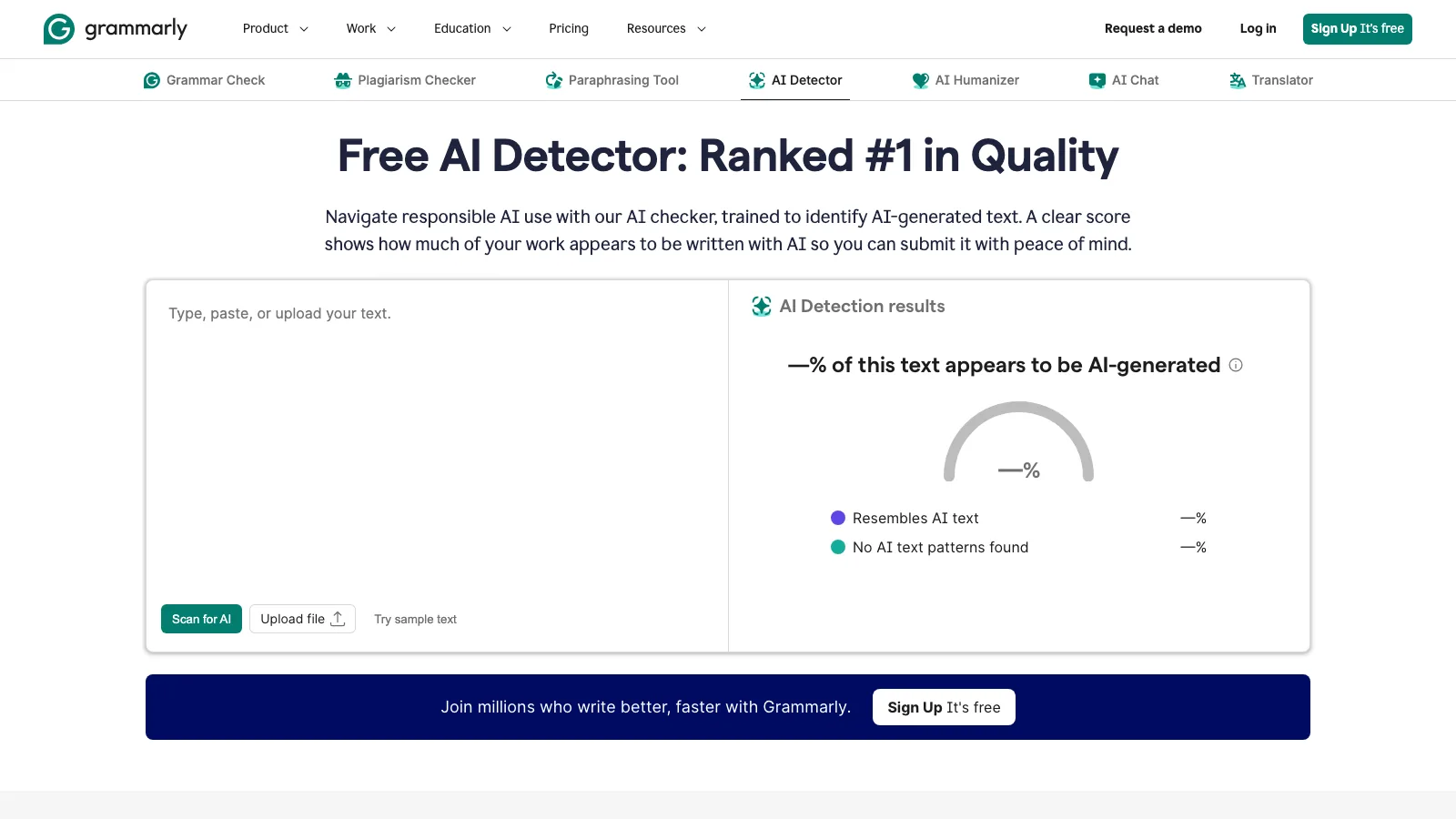
Image: Grammarly official website
- Popular Science (July 2026): Grammarly got all 4 samples right. Human text scored 0% AI, and texts written by Claude and Gemini scored 68% and 66% (Popular Science).
- Ahrefs (July 2025): Grammarly placed 7th of 8 detectors. It correctly scored human articles at 0%, but rated one fully AI article only 7% AI and missed half-AI articles completely (Ahrefs). Ahrefs sells its own detector.
Good news for students: Grammarly rarely flagged human writing as AI in these tests. But it often misses AI text. For tools built only for detection, see the best AI detectors.
Plagiarism checker
The weakest part of Grammarly. Scribbr's test found Grammarly "scored lower than 40% in all rounds of testing" (Scribbr), though Scribbr sells its own checker. DemandSage pasted a paragraph copied from its own site, and Grammarly marked it 100% original (DemandSage).
If plagiarism checks matter for your work, use a dedicated tool. See our list of the best AI plagiarism checkers.
Languages, apps and integrations
- Languages: more than 20. Full checks and rewrites cover English, Spanish, French, German, Portuguese and Italian, and Grammarly can translate into 19 languages (Grammarly).
- Apps: Windows and Mac apps, browser extensions for Chrome, Safari, Firefox and Edge, and an iOS and Android keyboard. The Chrome extension alone has 40 million users (Chrome Web Store).
- Where it works: Word, Google Docs, Gmail, Outlook, Slack and most websites with a text box.
Privacy and security
Check this setting. For individual Free and Pro users, "Product Improvement and Training" is turned on by default, which means your writing may be used to train Grammarly's AI. You can switch it off in your account's privacy settings. It's off and locked for Enterprise, Education and Business accounts bought through sales (Superhuman help).
The last known security issue was in 2018, when Google's Project Zero found a browser extension bug. Grammarly fixed it within hours and said there was no evidence any user data was taken (TechTarget).
Pricing
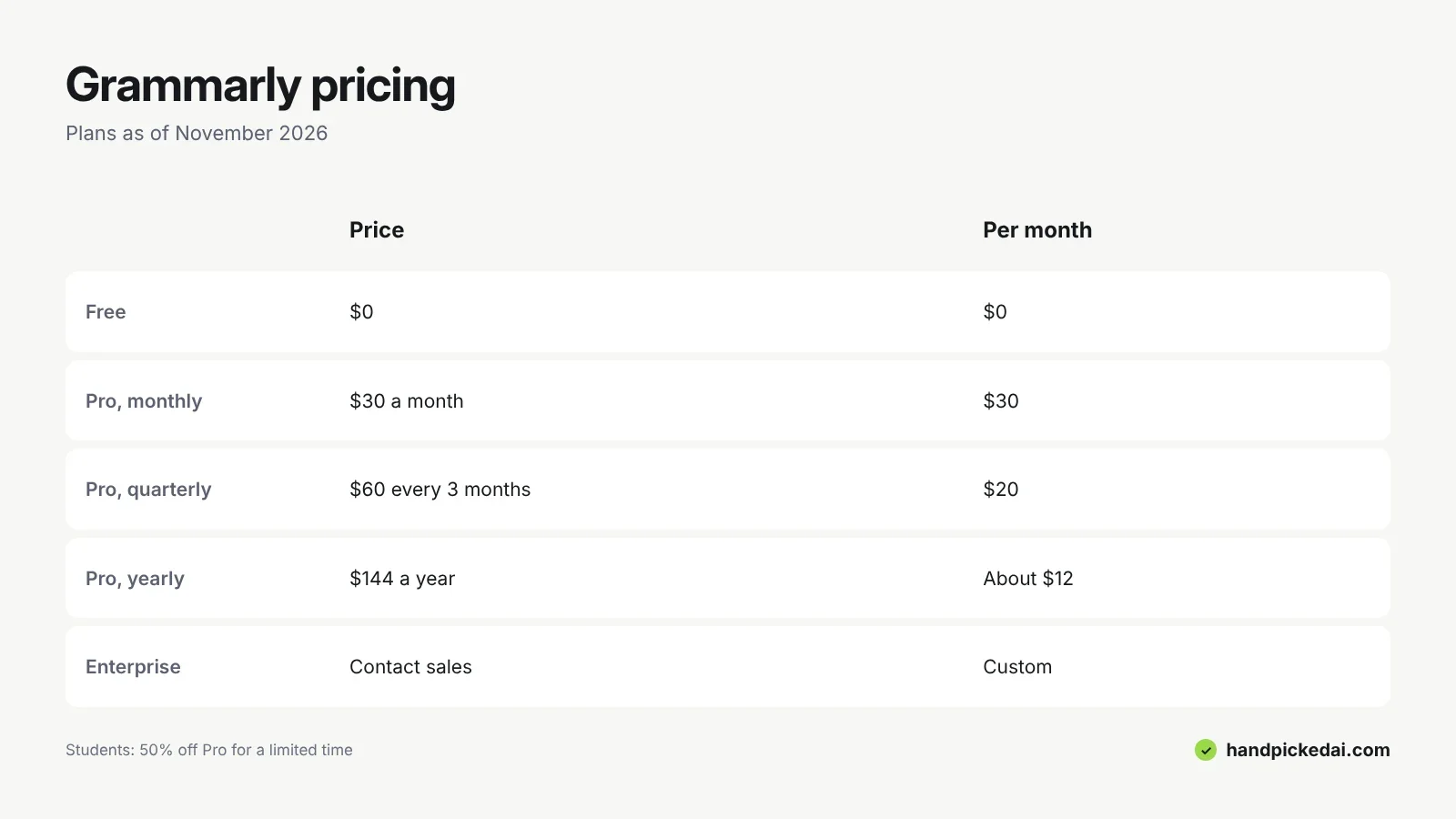
| Plan | Price | What you get |
|---|---|---|
| Free | $0 | Spelling, grammar, tone detection, 100 AI prompts a month, Authorship |
| Pro (monthly) | $30 a month | Rewrites, tone changes, 2,000 AI prompts, plagiarism and AI detection |
| Pro (quarterly) | $60 every 3 months | Same as above |
| Pro (yearly) | $144 a year (about $12 a month) | Same as above |
| Enterprise | Contact sales | Unlimited prompts, SSO, data controls |
Prices are from Grammarly's help center. Yearly billing costs less than half of paying monthly. See plans
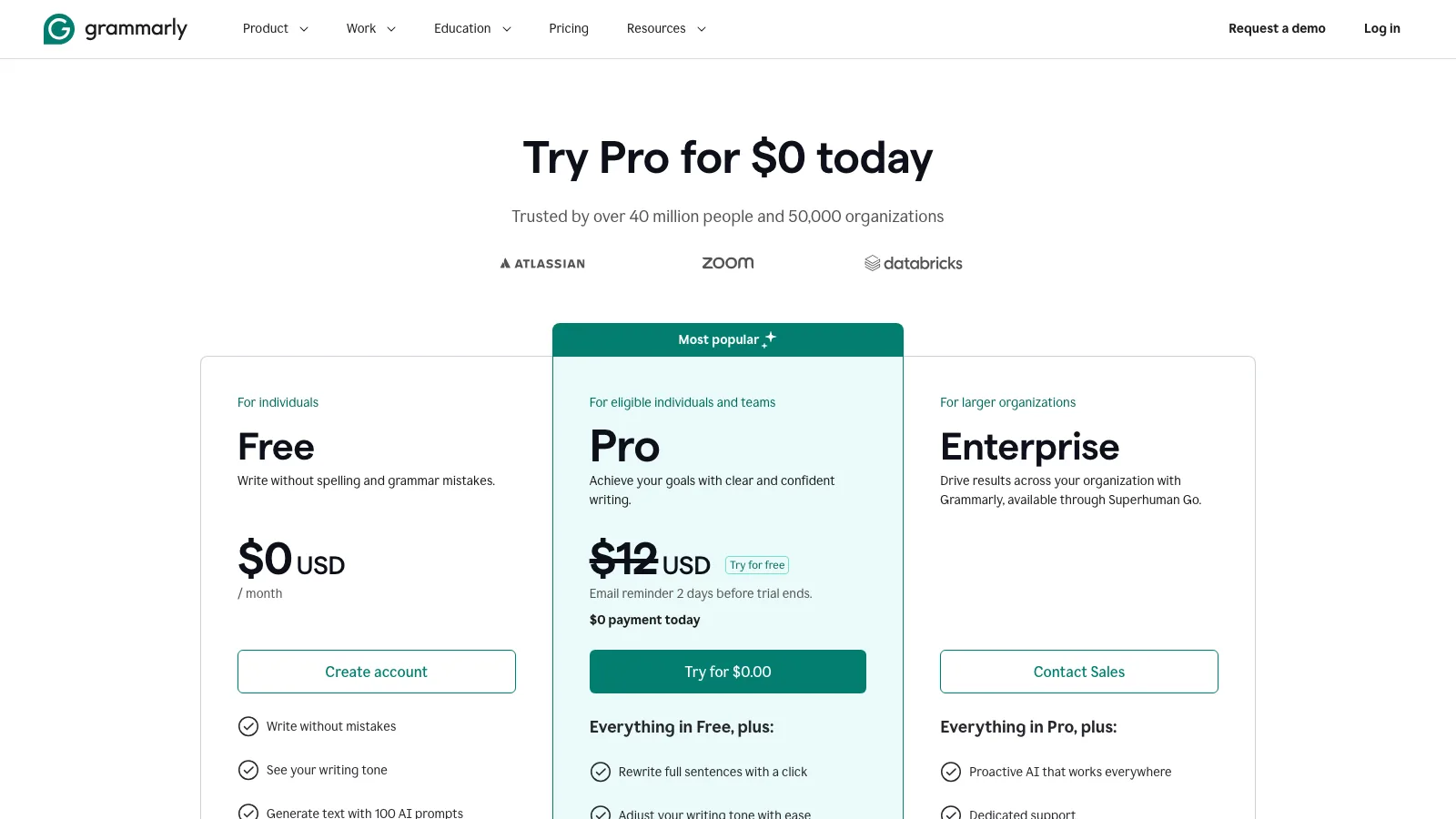
Image: Grammarly official website
- Students: 50% off Pro for a limited time, verified through SheerID, on the first subscription period only (Grammarly).
- App store prices differ: buying through Apple costs $29.99 a month or $139.99 a year for Premium, which has 1,000 AI prompts instead of 2,000 (App Store). Buying on the website gets you more.
- Free trials: offered from time to time, with an email reminder 2 days before the trial ends.
- Refunds: Grammarly says "refunds are issued only if required by law" (Grammarly). Billing is the top complaint on Trustpilot, so cancel before renewal if you don't plan to keep it.
What users say
| Platform | Rating |
|---|---|
| G2 | 4.7 out of 5 (14,100+ reviews) |
| Capterra | 4.7 out of 5 (7,200+ reviews) |
| App Store | 4.7 out of 5 (229K ratings) |
| Chrome Web Store | 3.9 out of 5 (43K ratings) |
| Trustpilot | 3.1 out of 5 (10,400+ reviews) |
Everyday users rate Grammarly highly for real-time fixes and how many apps it works in. The most common complaints are price, generic or overly formal rewrites, pop-ups, and billing and refunds.
What users like:
- "The real-time feedback and style suggestions make it easier for employees to write clearly and professionally." Rebecca R., Production Manager, on Capterra, May 2026
- "The best things about Grammarly is that it helps me with the real time grammar, spelling and sentence formation" Vibhav B., on G2, January 2025
- "very helpful and underrated extension especially for working professional." Abdullah Shaikh, on the Chrome Web Store
What users don't like:
- "I eventually needed premium for full grammar and plagiarism checks, which feels a bit steep on a student budget." Shaurya R., student, on Capterra, August 2026
- "It could be too polished sometimes that it makes my writing sound a little off" Oluwatobiloba S., content writer, on Capterra
- "I least liked that Grammarly Business can be expensive for small teams and sometimes suggests overly formal corrections." Lucky O., IT Manager who switched from QuillBot, on Capterra
- "I got charged over a 100€ with no warning, and they won't refund any of it." Melissa DK, on Trustpilot, October 2026
What expert reviewers say:
- "Grammarly sets the standard for accuracy and ease of use" Dario Villirilli, Reedsy, August 2025
- "Grammarly Premium is one of the pricier writing assistant subscriptions." Gina Rancano, Scribbr
Video: Grammarly's AI features tested
Want to see the AI features in action? This independent video tests Grammarly's AI tools on real writing. It isn't made by Grammarly, though the description includes a link to try Grammarly.
Grammarly alternatives
- QuillBot: cheaper, and strongest at paraphrasing. Premium is $8.33 a month billed yearly (QuillBot).
- ProWritingAid: better for long-form and fiction writers, with deep style reports (ProWritingAid).
- LanguageTool: best for writing in many languages, with support for 30+ languages and a free plan (LanguageTool).
For more options, see our list of the best AI grammar checkers.
Final verdict
We rate Grammarly 4.3 out of 5. It's still the easiest and most complete writing assistant, it works in nearly every app, the free plan is genuinely useful, and Authorship is a smart, free answer to AI cheating worries. It loses points for its weak plagiarism checker, mixed AI detection, generic rewrites, the high monthly price, the no-refund policy, training on user writing by default, and the Expert Review controversy. Use it free if you just want clean writing. Buy Pro yearly, or with the student discount, if you write every day and will use the rewrites and AI.
FAQ
Is Grammarly free?
Yes. The free plan fixes spelling and grammar, detects tone, includes Authorship and gives you 100 AI prompts a month. Full-sentence rewrites, plagiarism checks and detailed AI detection need Pro.
How much does Grammarly cost?
Grammarly Pro is $30 a month, $60 every three months, or $144 a year (about $12 a month). Enterprise pricing is by quote.
Is Grammarly Premium worth it?
Grammarly Premium is now called Pro on the website. It's worth it if you write every day and will use the rewrites, tone changes and AI prompts, especially on yearly billing or with the student discount. If you only need spelling and grammar, the free plan is enough.
Is Grammarly safe and secure?
Grammarly's last known security issue was fixed within hours in 2018, with no evidence any user data was taken. But for individual users, writing may be used for AI training by default. Switch off "Product Improvement and Training" in your account settings if you don't want that.
Is it possible to get a refund from Grammarly?
Only if the law requires it. Grammarly's policy is that refunds are issued only where required by law, and purchases through Apple's App Store go through Apple.
Is there anything better than Grammarly?
For most people, no single tool beats Grammarly overall. QuillBot is cheaper and better at paraphrasing, ProWritingAid is better for long-form writing, and LanguageTool is better for many languages.