Copilot vs ChatGPT: Which AI Assistant Is Better for Work, Writing and Microsoft Apps
Pick Microsoft Copilot if you already pay for Microsoft 365 and spend your day in Word, Excel, Outlook and Teams. Pick ChatGPT for writing, research, coding and everything else.
Short answer: pick Microsoft Copilot if you already pay for Microsoft 365 and spend your day in Word, Excel, Outlook and Teams. It works inside those apps, and on business plans your data stays inside Microsoft 365. Pick ChatGPT for everything else: writing, research, coding and a wider set of features. ChatGPT now also works inside Word, Excel and PowerPoint through an add-in, so the gap is smaller than it used to be.
Microsoft apps
CopilotWriting
ChatGPTResearch
ChatGPTImages
CopilotCoding
ChatGPTPrivacy
CopilotWe compared Microsoft Copilot and ChatGPT using Microsoft's and OpenAI's official pages, independent same-prompt tests and real user reviews. We didn't run our own tests, so every claim links to its source. Plans and prices are current as of November 2026. One note: this page is about Microsoft Copilot, the AI assistant. GitHub Copilot is a separate coding tool, which we cover in Cursor vs Copilot.
At a glance
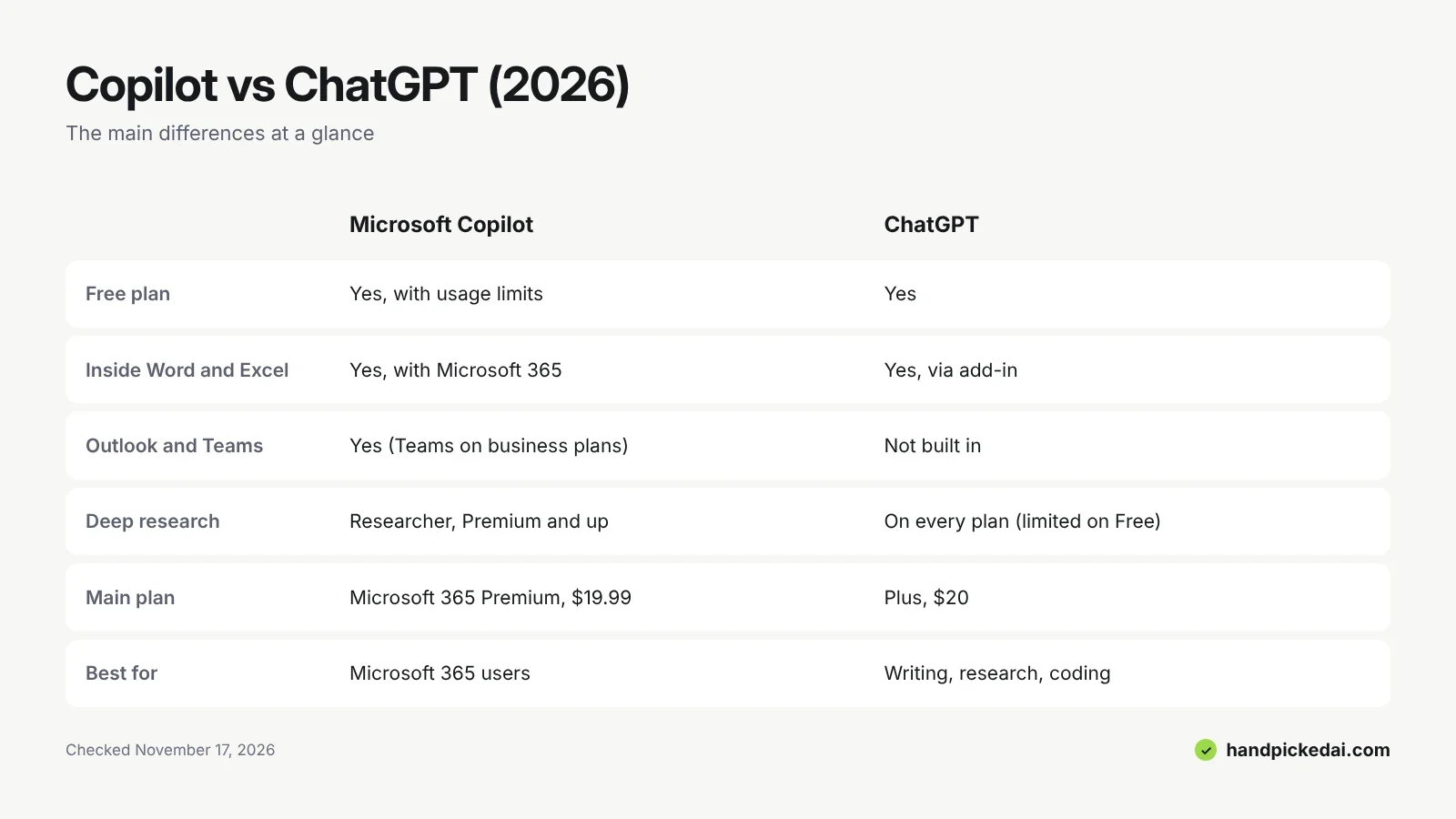
| Microsoft Copilot | ChatGPT | |
|---|---|---|
| Made by | Microsoft | OpenAI |
| Free plan | Yes, with a Microsoft account and usage limits | Yes |
| Inside Word, Excel, Outlook | Yes, with a Microsoft 365 plan | Word, Excel, PowerPoint via add-in, on every plan |
| Teams and work data | Yes, on business plans | Through connectors |
| AI models | Microsoft, OpenAI and other models | OpenAI models |
| Deep research | Researcher, from Microsoft 365 Premium | Limited on Free, more on paid plans |
| Main paid plan | Microsoft 365 Premium, $19.99 a month | Plus, $20 a month |
| Best for | Microsoft 365 users and companies | Writing, research, coding, everything else |
Microsoft apps
Winner: Copilot
Copilot works inside Word, Excel, PowerPoint and Outlook with any paid Microsoft 365 plan from Personal up (Microsoft). On business plans it also works in Teams and answers questions from your work email, files and chats (Microsoft).
ChatGPT has caught up partly. Its official add-in brings ChatGPT into Excel, Word and PowerPoint on every plan, including Free (Microsoft Marketplace). It doesn't reach into Outlook or Teams the same way, though. If your company runs on Microsoft 365, see why we picked Copilot for those teams in our list of the best AI tools for business.
Writing and everyday help
Winner: ChatGPT
In G2's same-prompt tests on the free versions, ChatGPT won summarizing, content writing, coding and real-time research, while Copilot won creative writing, image generation and data analysis. ChatGPT came out ahead 4 to 3. An older Techpoint Africa test with 10 prompts also went to ChatGPT, 5 to 4 with one tie. Both tests ran before Microsoft rebuilt its Copilot app in August 2026.
Research
Winner: ChatGPT
Both search the web and link their sources (Microsoft, OpenAI). For longer research, ChatGPT offers deep research on every plan, limited on Free and more on paid plans (ChatGPT pricing). Microsoft removed Deep Research from free Copilot in August 2026. Its replacement, Researcher, comes with Microsoft 365 Premium and up, not Personal or Family (TechCrunch, Notebookcheck).
Images
Winner: Copilot, by a little
Both make images. In G2's test, Copilot made its image in minutes and matched the prompt more closely, while ChatGPT took over 30 minutes (G2). Paid Microsoft 365 plans raise Copilot's image limits (Microsoft). ChatGPT gives limited images on Free and unlimited on Pro.
Coding
Winner: ChatGPT
ChatGPT won the coding task in G2's test and the debugging task in Techpoint's. It also includes Codex, OpenAI's coding agent. If you're a developer, you probably want GitHub Copilot or a similar tool instead. Compare them in our list of the best AI coding assistants.
AI models
Winner: Copilot for business, ChatGPT for individuals
Microsoft says Copilot uses models from Microsoft, OpenAI and other developers, and picks the model for you on consumer plans (Microsoft). It doesn't say which model the free app uses. On business plans, you can choose between OpenAI and Anthropic's Claude models in PowerPoint and the Researcher agent (Microsoft). ChatGPT runs OpenAI's own models and tells you which one, with GPT-6.1 Sol on Plus.
Privacy
Winner: Copilot for Microsoft 365 users
- Copilot: in Microsoft 365 apps for home, your prompts, responses and files aren't used to train AI models (Microsoft). On business plans, data stays inside Microsoft 365 and isn't used for training (Microsoft). The older free Copilot app did train on chats, with an opt-out in settings (Microsoft).
- ChatGPT: personal chats may be used for training unless you turn it off. Business, Enterprise and API data isn't used by default (OpenAI).
Pricing
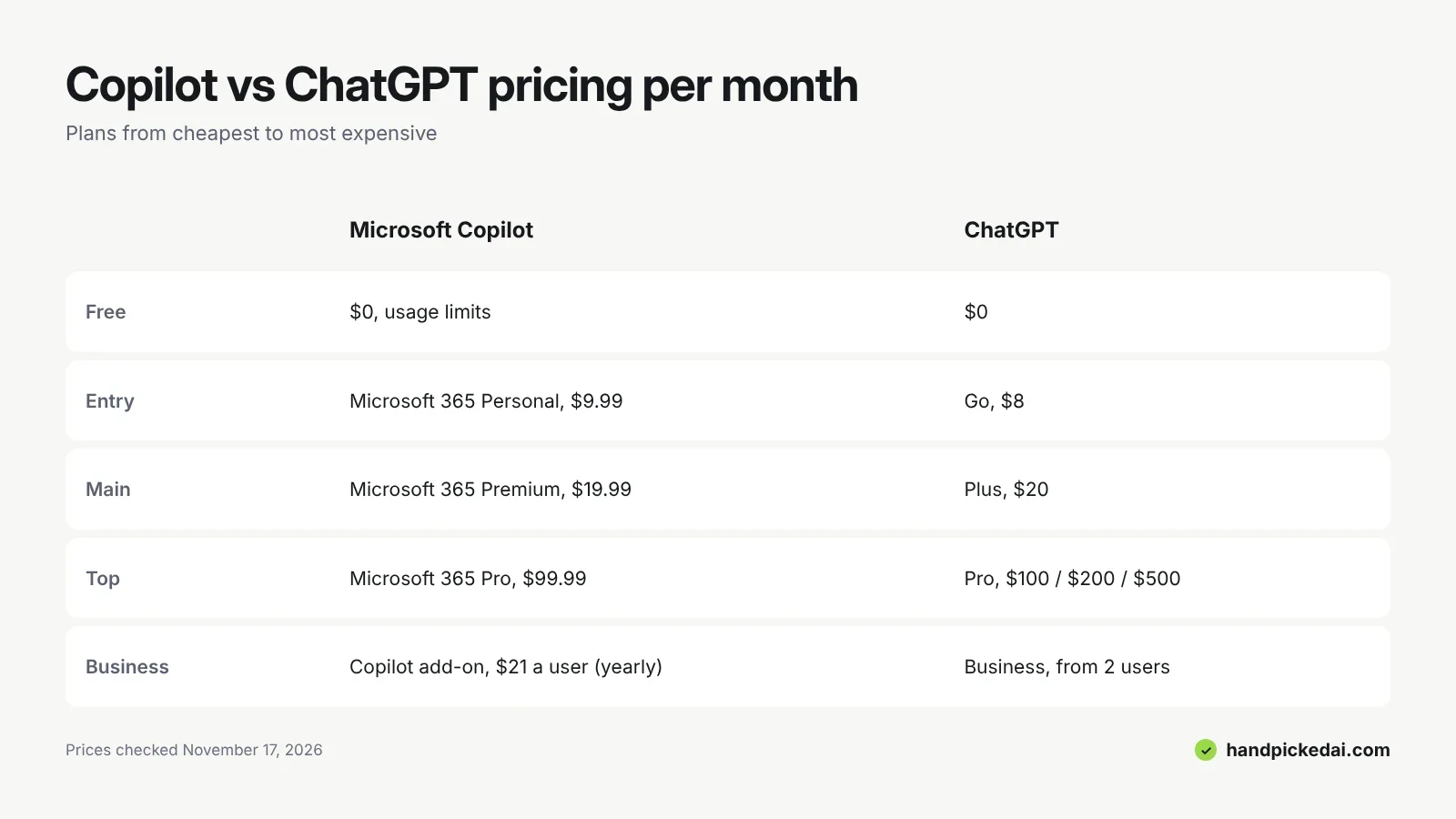
| Plan level | Microsoft Copilot | ChatGPT |
|---|---|---|
| Free | $0, with usage limits | $0 |
| Entry | Microsoft 365 Personal, $9.99 | Go, $8 |
| Main | Microsoft 365 Premium, $19.99 | Plus, $20 |
| Top | Microsoft 365 Pro, $99.99 | Pro, $100, $200 or $500 |
| Business | Copilot add-on, $21 a user (yearly) | Business, from 2 users |
Winner: Copilot, if you need Office anyway. Microsoft 365 plans include Word, Excel, Outlook and OneDrive storage, so Copilot comes with apps you might pay for already. Family ($12.99) shares the apps with up to 6 people, but only the owner gets the AI. The business add-on is $18 a user until December 31, 2026 for eligible existing customers. See Copilot pricing · See ChatGPT pricing
What users say
- Microsoft Copilot has 4.3 out of 5 from about 730 reviews on G2. Recent reviewers praise how fast it works in Word and Excel and how well it fits into Microsoft 365.
- ChatGPT has 4.6 out of 5 from more than 4,700 reviews on G2. People like that it's easy, fast and saves time. The top complaint is inaccurate answers, then misread prompts and forgotten context.
Which should you choose?
- Choose Copilot if you already use Microsoft 365, live in Outlook and Teams, or work at a company that wants AI inside its Microsoft data.
- Choose ChatGPT for writing, research, coding and anything outside Microsoft apps, or if you want to know which model you're using.
- Use both if you can. Copilot is free with a Microsoft account, and ChatGPT's free plan now works inside Word and Excel too.
Comparing ChatGPT with other assistants? Read our ChatGPT vs Gemini comparison. For tools to use alongside either one, see the best AI tools for work.
How we compared
We took plans, features, models and privacy terms from Microsoft's and OpenAI's official pages and checked US prices on November 17, 2026. Since we didn't run our own tests, we used G2's and Techpoint Africa's same-prompt tests, and news from TechCrunch on Microsoft's August 2026 Copilot changes. User feedback comes from each tool's G2 reviews.
FAQ
Does Microsoft Copilot use ChatGPT?
Not ChatGPT itself. Microsoft says Copilot uses models from Microsoft, OpenAI and other developers. On business plans, you can pick OpenAI or Anthropic's Claude models in some apps.
Is Copilot free?
Yes. There's a free version with a Microsoft account, with usage limits. Paid Microsoft 365 plans, from Personal at $9.99 a month, raise those limits and add Copilot inside Word, Excel, PowerPoint and Outlook.
Can I use Copilot without Microsoft 365?
Yes. The free Copilot app works on its own. To use Copilot inside the Word, Excel, PowerPoint and Outlook desktop apps, you need a Microsoft 365 plan.
Is Copilot better than ChatGPT for coding?
No. ChatGPT won the coding tasks in independent tests and includes the Codex coding agent. For coding inside your editor, look at GitHub Copilot, which is a different product from Microsoft Copilot.
Can I use both ChatGPT and Copilot together?
Yes. Many people use Copilot inside Outlook and Teams and ChatGPT for writing and research. ChatGPT's add-in also works in Word, Excel and PowerPoint on every plan, including Free.
How secure are these AI assistants for business use?
Both have business plans that don't train on your data. Copilot's business plan keeps prompts and responses inside your Microsoft 365 setup. ChatGPT Business and Enterprise data isn't used for training by default. On free personal plans, check the training settings in each app.